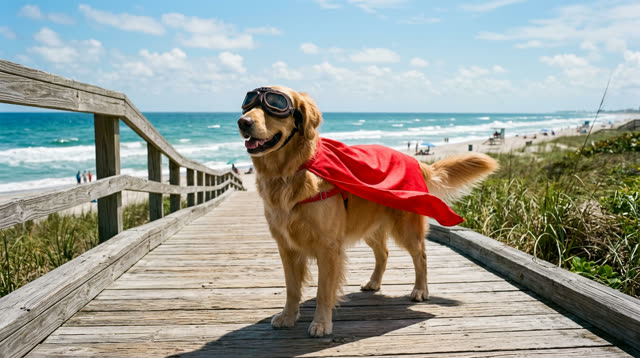
Pet costume + new location
Every stride, ear flop and the pace toward the camera stay the same. The cape, goggles and beach boardwalk come from the reference. 5.0 s in, 5.0 s out, 1280×720.
Upload a clip and one reference image. The AI keeps every move, the timing and the camera from your clip, and rebuilds the look of the subject and the scene from the reference.
Tip: the reference image should show the new look on its own — an outfit or product photo, a character, or a place. Reference photos of real people are declined by the engine (credits refunded). Use only footage you have the rights to; uploads are deleted when the video finishes.
Every pair below is an actual output from this tool on Oct 1, 2026 — no cherry-picked frames, no editing afterwards. Source clips were generated with Seedance; reference images were made with an image model. Each video cost 30 credits.
Every stride, ear flop and the pace toward the camera stay the same. The cape, goggles and beach boardwalk come from the reference. 5.0 s in, 5.0 s out, 1280×720.
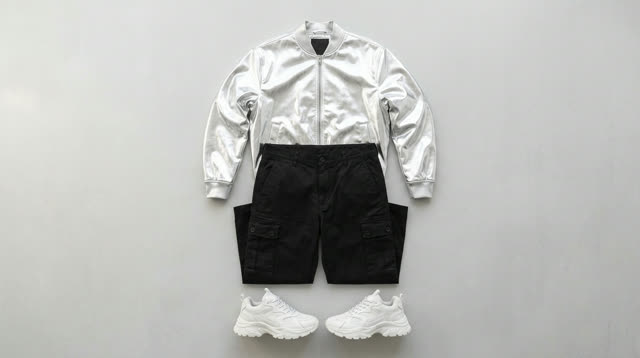
Same dancer, same moves, same studio. The silver jacket and white sneakers came through; the cargo pants came out as shorts — check details like this before you post.
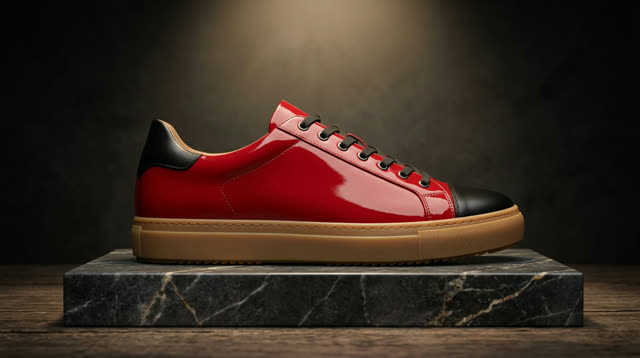
The turntable spin and camera stay locked; material, colors and the pedestal follow the reference. Our first try used a reference with a brand logo and the logo carried over — use unbranded references for products you don't own.
Not a mock-up. This is a real Seedance 2.5 edit run on Oct 1, 2026 with an original illustrated clip. Watch the arm on the left side of the frame: it swings in front of the waist and returns, while the other arm stays still — in both videos.
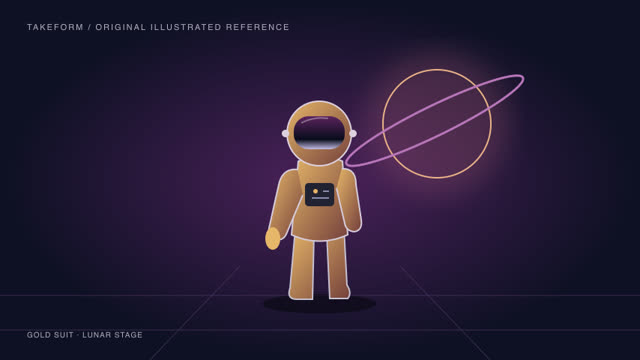
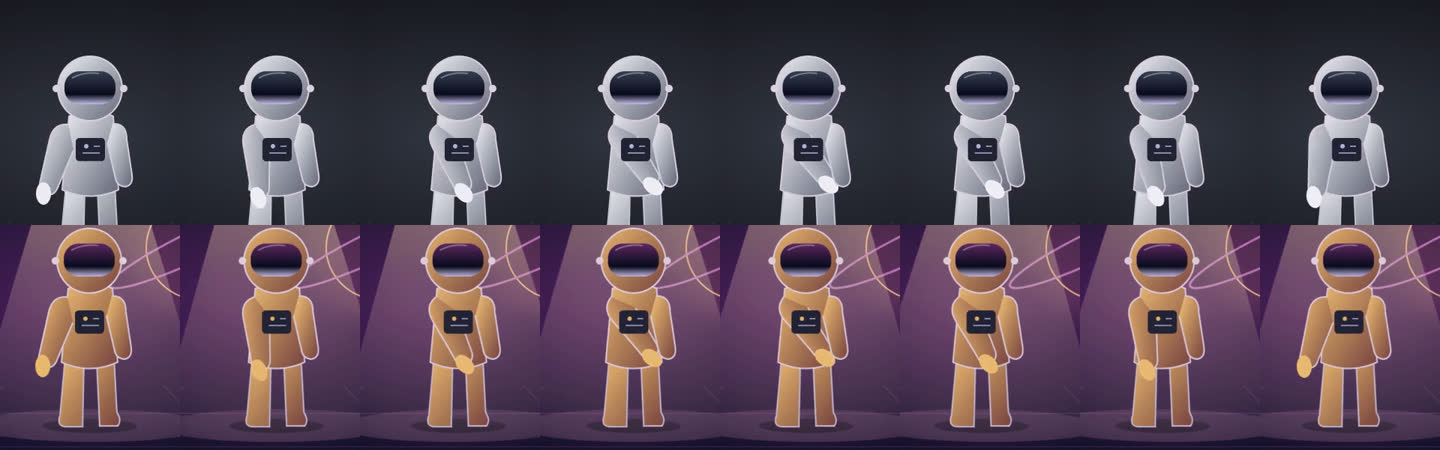
Top: source. Bottom: result. One frame every 16 frames (0.67 s). The screen-left arm reaches across the waist at the same moments; the screen-right arm stays still.
What wasn't perfect: a caption from the reference image carried into the frame. The generator now tells the engine not to copy text or logos from the reference, but check the result before you publish. One test is one test — results vary with the clip.
No prompt engineering and no keyframes. You decide what to keep by uploading it, and what to change by showing it.
Any clip up to 60 seconds — pick the 5 seconds you want. One clear subject works best. The movement, gestures, timing, camera moves and framing are all taken from this clip.
One reference image of the character, costume, material or place you want. Choose whether it replaces the character, the scene, or both.
30 credits are reserved when you start and returned if the render fails. The 720p MP4 is ready in a few minutes; download it within 24 hours.
Other Genjutsu-style tools let you find this out after a failed render. Here it is up front.
One flat price per video, no resolution tiers, no hidden minimums. Credits are shared with Keepframe's image tools (a standard image uses 5).
| Spec | Keepframe Genjutsu-style video |
|---|---|
| Input clip | MP4 or MOV up to 60 s and 100 MB, 480p or higher. Clips over 6 s: you pick a 5-second segment. Clips of 4–6 s are used whole. |
| Reference | 1 image (JPEG, PNG, WebP), at least 300 px per side |
| Output | 720p MP4, same aspect ratio as the clip, about the same length (up to 0.4 s shorter), no audio, no watermark |
| Engine | ByteDance Seedance 2.5 video edit (via Volcengine Ark) |
| Cost | 30 credits per finished video. Rejected or failed renders are refunded automatically. |
| Storage | Your uploads are deleted as soon as the render finishes. Download the result within 24 hours. |
Compare all credit plans and usage costs
1 video (+20 credits for 4 images)
No subscription
4 videos · $3.00 per video
No subscription
100 credits · 3 videos
Credits carry over. Cancel anytime.
250 credits · 8 videos · $2.38 per video
Credits carry over. Cancel anytime.
Higgsfield created Genjutsu and it is the more complete tool. Here is an honest comparison so you can pick the right one.
| Keepframe (this page) | Higgsfield Genjutsu | |
|---|---|---|
| Clip length | 5 s per video (upload up to 60 s and pick the part) | 4–30 s |
| Reference images | 1 | Multiple |
| Output | 720p | Up to 1080p (reported by third parties) |
| Price per video | Flat 30 credits, shown before you start | Credit cost shown in the generator; varies by length and resolution |
| Failed renders | Refunded automatically | Not stated on the product page |
| Real people | Reference photos of real people are declined (refunded) — use an outfit or product photo | Not stated on the product page |
| Watermark | None | On free-plan output (per user reports) |
| Best for | Short loops, mascots, characters, products, quick tests | Longer shots, higher resolution, multi-reference projects |
If you need clips longer than 6 seconds, 1080p or several references, Higgsfield is the better fit. Keepframe is independent and not affiliated with Higgsfield. Competitor details from higgsfield.ai/genjutsu and public reviews, checked Oct 1, 2026.
Film anyone in a full mascot suit doing the move, then swap in your brand character's look.
Record one performance with your avatar and try new outfits or worlds without re-rigging.
Turn one spin or reveal shot into a new material, finish or set from a single reference.
Keep your pet's exact movement and change the costume or the scene around it.
Preview how an animated shot reads in a different art direction before committing.
Use a flat-lay or product photo of the clothes as the reference and keep the same walk or dance.