Free Image Color Changer
Click a color in your photo, pick a new one — shading and texture stay. Free, full resolution, processed on your device.
1. Click the color you want to change in the left image. 2. Pick the new color.
Need "make the jacket red" or "turn the car matte black" without picking colors? Try the AI image editor — describe the change, lock what must stay. First result free.
Real result
Original product photo (left) and the same photo recolored with this tool (right): the color moved, the shading and highlights stayed.
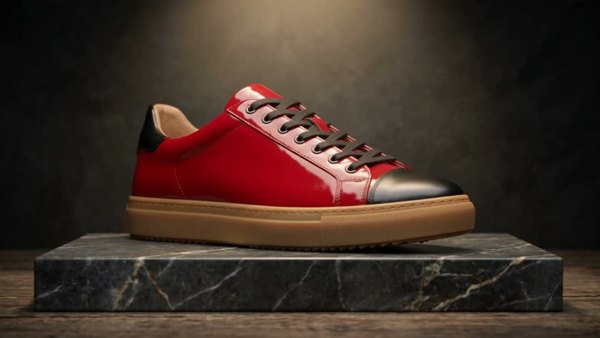
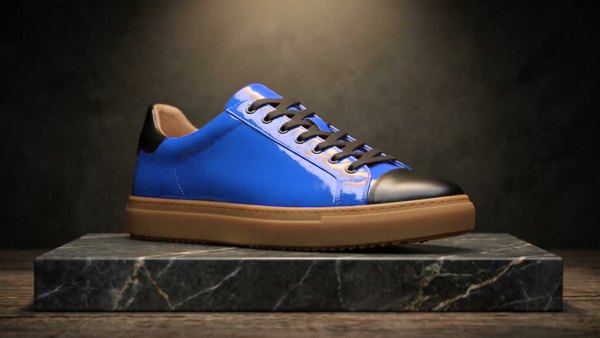
Keepframe's image color changer recolors one object in a photo: click the color you want to replace, choose the new color and set the tolerance. Matching pixels are shifted to the new hue while keeping their brightness, so shading, folds and highlights stay. It runs in your browser, is free with no sign-up or watermark, and exports a full-resolution PNG.
Facts checked October 10, 2026.
What you get
| Price | Free. No credits, no sign-up, no daily limit. |
|---|---|
| How it works | Pixels close to the color you clicked (by hue) are shifted to the new color; brightness is kept, so shadows and texture stay. |
| Privacy | Runs in your browser; the image is never uploaded. |
| Output | PNG at the original resolution. |
| Best for | Recoloring one clearly colored object: clothing, products, cars, logos, flat graphics. |
| Not the right tool for | Turning black or white objects into colors (there is no hue to shift) or objects that share their color with the background — use the AI editor for those. |
How it works
1. Upload
JPG, PNG or WebP. It stays on your device.
2. Click the color, pick the new one
Adjust tolerance until only the object you want changes.
3. Download
The full-resolution PNG is recolored when you download.
FAQ
Is this image color changer free?
Yes. It runs in your browser: no sign-up, no credits, no watermark, and the image is never uploaded.
How do I change the color of one object?
Click the color you want to change in the original image, pick the new color, and adjust tolerance until only that object changes. Then download the PNG.
Will shadows and texture stay?
Yes. Only the hue (and proportionally the saturation) moves; each pixel keeps its brightness, so highlights, folds and shading stay.
Can I turn a white or black object into a color?
Not with this tool — white, gray and black have no hue to shift. Use the AI image editor and describe the change (first result free).
Why did part of the background change too?
It shares a similar hue. Lower the tolerance, or keep "Leave white, gray & black alone" on.
What resolution is the download?
Your original resolution, as PNG. The on-screen preview is scaled for speed.